Showing posts with label Gadgets. Show all posts

Sunday, January 16, 2011

Enjoy Bluray movies via usb on Samsung TVs - Tips & Tricks


One of the best features of Samsung's Plasma TVs is the ability to play video files directly from a USB memory stick or hard drive. This feature is alternately referred to as USB Movie 2.0 or Wiselink. Sure, you could buy a TV without this and then add on something like WDTV or Roku but that's an added expense and one more remote to clutter things up. Samsung has done a great job of integrating the media player into the TV. However, the manual doesn't explain everything as clearly as it could, so I've written down some of the problems and solutions I've encountered.

The TV supports a variety of video file formats, such as AVI, MP4, MKV, and VOB. These are really just "containers" for audio and video information, so just because you have one of these files there's no guarantee that the TV will play it. Within the container, the audio and video is stored using a codec. Common video codecs are Divx, Xvid, and MPEG4. Common audio codecs are AC3, MP3, and DTS. You can use software like VLC to tell what codecs were used to create a particular file.

Not supported audio codec

MKV has become popular with high definition material (720p, 1080p). However, the most common problem when you try to play an MKV file is that the video works but the error message comes up: "Not supported audio codec" and there is no sound. Most of the time, this is because the audio was encoded with Digital Theater System (DTS) which the TV doesn't support (Samsung didn't want to pay the license fee). You can easily fix this by reencoding the file to Dolby Digital (AC3) using PopCorn Audio Converter.

Dialog is not in English

MKV files often contain more than one audio track. However, the TV has no way to select between the tracks, so if the default audio track is not the one you want, you can't change it while you're watching. First, open the file with VLC to make sure there is an English language track in the file. Then, open the file in MKVmergeGUI (part of MKVtoolnix) which will allow you to select exactly which audio track you want, and create (aka "remux") a new file that has only that audio track.

It is possible that a file could have both problems - DTS audio and a primary non-English track. In that case, first remux a new MKV using mkvmerge with only the audio track you want. Then, run it through the DTS to AC3 conversion.

The TV won't display subtitles

Just as an MKV file can contain more than one audio stream, it may also contain subtitles, however the TV doesn't support this subtitle format. First, extract the subtitles from the file using MKVExtractGUI. Then, run the output through Subtitle Workshop to convert to SRT format which the TV supports. Make sure you name your new SRT file exactly the same as your MKV file (except for the file name extension, which will obviously be different: .SRT versus .MKV) and put it in the same directory as the video file. Then, you can activate the captions using the CC button on the TV's remote control.

Archiving your DVDs to a hard drive

With 1TB hard drives available for under $100 now, you might want to backup your DVD collection. This would allow you to play any of your movies off the hard drive without having to search for the discs. However, if you try to just copy the files off your DVD and play them on the TV, you probably won't get what you're expecting, even though the TV supports VOB files. The file may not play at all, or the video will start and end in weird places. This is because the DVD menu also contains instructions on where the video should start and stop, but the TV doesn't know how to read that data. The solution is to use DVDShrink to remaster the DVD and extract just the video you want. This will work for both a movie that is one big file as well as a DVD with TV shows on it, where you want a separate output file for each episode. Put the DVD in the computer and start DVDShrink. Select the Re-Author function and then select the various video tracks that you want to extract. Select Backup to copy those files to your hard drive. Now you can open each of those VOBs will be a self-contained video file that the TV can recognize.

Sunday, October 10, 2010

Nokia Plug and Touch turns any display into a touchscreen [Video]

Nokia Plug and Touch turns any display into a touchscreen [Video]:

Amazing app from Nokia. The Nokia Blog spotted “Plug and Touch” running on the Nokia N8, an app which basically turns any HDMI-connected display (whether HDTV, projector or something else) into a huge touchscreen.


nokia plug and touch research 540x303


The app takes advantage of the N8′s HDMI port, putting the Symbian^3 smartphone’s display up on your big-screen TV.  Then the handset’s 12-megapixel camera is used to keep track of where your finger is, basically working as an impromptu optical touchscreen.


Right now, it’s apparently not entirely accurate or polished, and Nokia’s people are working on the speed of responsiveness.  At some point they’re hoping that the phone itself won’t need to be clamped into place and the physical connection cut, perhaps using WiFi streaming with DLNA instead.  With more of Nokia’s high-end handsets packing HDMI connections, we’re hoping this is something that graduates from the labs and appears on shipping devices – it’s just the sort of thing Symbian needs to show people it’s still a relevant OS.

Looxcie wearable camcorder will take your lifecasting to the next, boring level

Looxcie wearable camcorder will take your lifecasting to the next, boring level: "

The Looxcie wearable is an awesome creation. It's an always on camera that stores up to five hours of video, and is capable of quickly emailing short clips to your various social networks . Once your cam reaches its max storage capacity, it begins purging the oldest video and continues to record. Using Looxcie's app enables you to quickly share your videos with the world. The Looxcie wearable video camera is available now for $199 -- but please keep in mind: watching you watch.


N8 Design by Community: the finished concept

Design by Community: the finished concept: "

NokiaU008.jpgGLOBAL – It seems like a world away from when we first unleashed Design by Community. The idea was simple. Gather your collective thoughts to create your ultimate concept device. There were limits, as there are with any design process and so we ushered you through a series of stages, tackling each element of the device’s build. With the specs refined, we handed these over to the Nokia design team to create some concept sketches. You responded in your droves, with over 18,000 votes cast to decide which of the three concepts should be turned into a final render. Oh, and you also suggested and voted for the concept’s name. Ladies and gentlemen, we bring you the Nokia U (concept device).


Check out the images below and further down you’ll find the specs you as a community came up with.

NokiaU001.jpg


NokiaU002.jpg


NokiaU003.jpg


NokiaU004.jpg


NokiaU005.jpg


NokiaU006.jpg


NokiaU007.jpg


NokiaU008.jpg


NokiaU009.jpg


NokiaU010.jpg


Display and user interface


Display: 4-inch capacitive 16:9

Power button, camera, zoom and volume button controls


Size and shape


Shape: Monoblock

Dimensions: 60 x 110 x 6-10mm

Extras: Auto lens cover


Materials


Material: Aluminium

Finish: Soft touch

Colour: Single colour

Durability: Super strength


Operating system


Open source operating system with unlimited multitasking.

The DbC OS 1 sports temperature and location sensors so your device constantly monitors your whereabouts and the local conditions.

Device-based storage is supported.

The majority of OS functionality responds to touch control.


Connectivity


Support for 802.11 n/b/g wireless standards.

USB 3 connectivity.

HDMI connectivity.

Cable charger.

Dolby Surround Sound.


Camera


8-megapixel

4X optical zoom

Dual LED and Xenon flash

HD video capture

Instant image capture


Enhancements


Kinetic power booster

Multiple OS support

Surround Sound Speakers

Upgradable Flash memory

Upgradable image sensor


And here she is:


Digg
Sphinn
del.icio.us
Facebook
Mixx
Google Bookmarks
email
Print
Slashdot
StumbleUpon
Technorati
Tumblr


"

Smart Plus: The Multimedia Computer That Does… Everything!

Smart Plus: The Multimedia Computer That Does… Everything!: "

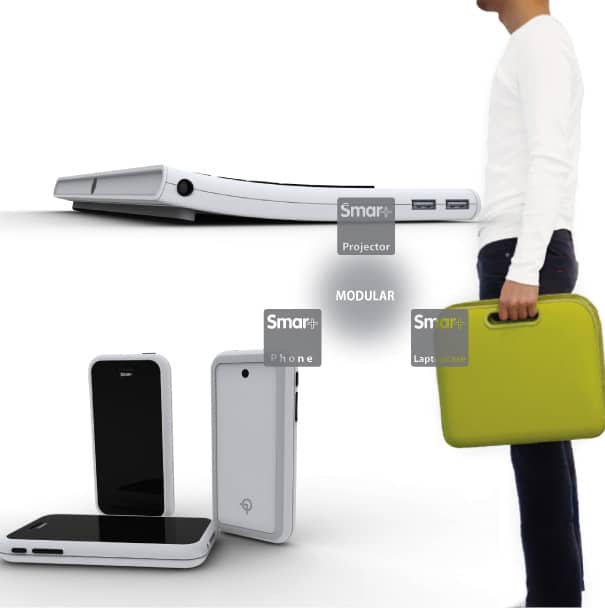
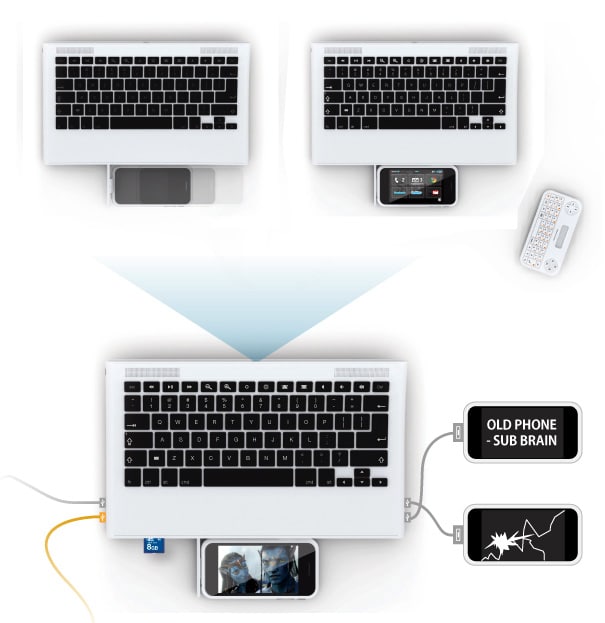
We are all too familiar with new concepts and ideas when it comes to niche gadgets with focused uses such as cellphones, projectors and remotes. However, what if we could bundle all that into one uber cool gadget that would handle everything we need to take care of on a daily basis? Wouldn’t that be the ultimate gadget to have? It’s really not that easy, but there sure are people out there that are inspired to figure it out. Usually when we see products that try to take on everything they fall short in some areas, like the uses themselves.


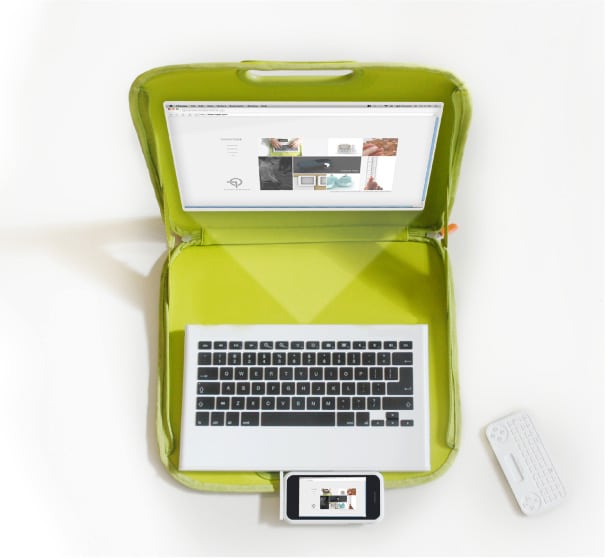
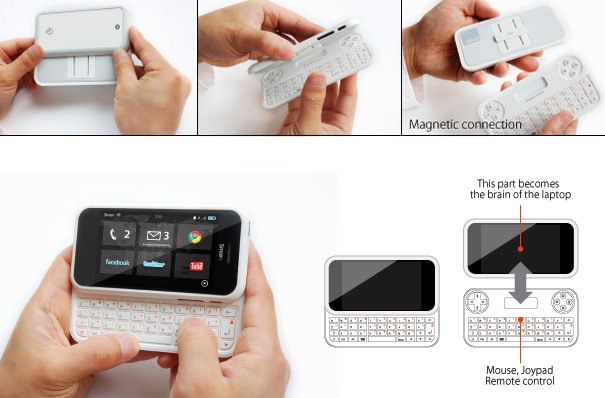
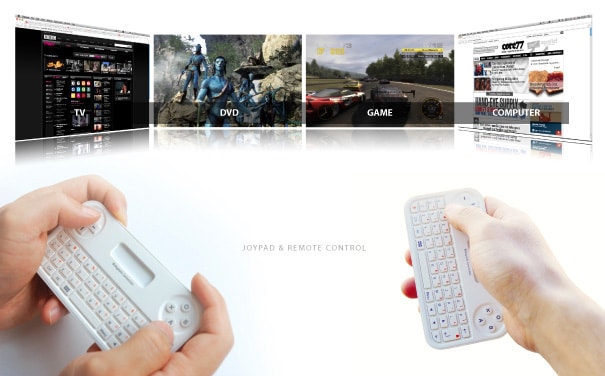
But there are, of course, some rather interesting concepts out there that really get it. One of those designs is conceptualized by designer Eunggyu Lee who has managed to bundle our every day gadgets into one awesome media station/computer device, or, actually it’s built up of several devices that are all interconnected. The smaller gadgets use the computer as a base station to build intelligence through it.


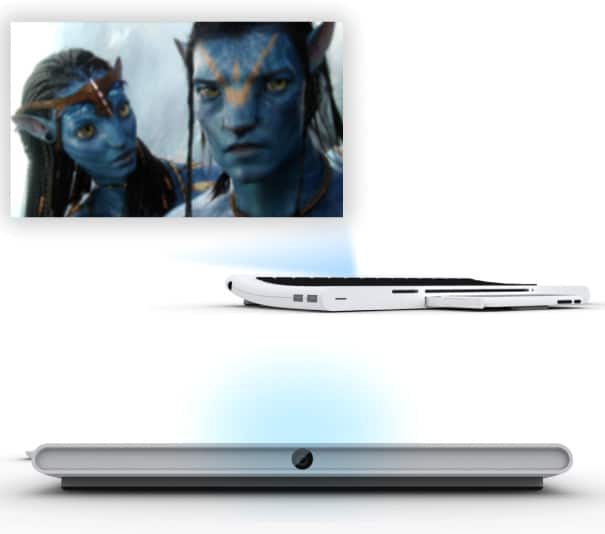
The entire concept is built up of a main computer, remote, cellphone and projector. If you have old cellphones laying around at home, you can even plug them in and use their CPU as additional processing power. What’s really awesome about this design is that the keyboard is slightly bent at the top end which holds the projector. This means that when you activate it and want to watch a presentation or a movie, you get the picture snugly projected on the wall in front of you in the perfect spot. No more trying to place it just right, stacked on books, or whatever we use to align it to our preferred height. Will it become reality? Well, only time will tell.


"

ON TIME Headset: New Technology To Keep You Informed

ON TIME Headset: New Technology To Keep You Informed: "

It’s not an understatement to say the once this whole social networking business got booming, every company, big or small, has gotten a much busier schedule to maintain. Keeping up with what goes on has almost become a full time job, and finding the right tools to keep track of the fast changing trends can sometimes be hard, if not impossible. There are; however, a few tools in development to keep us more at ease and more structured.


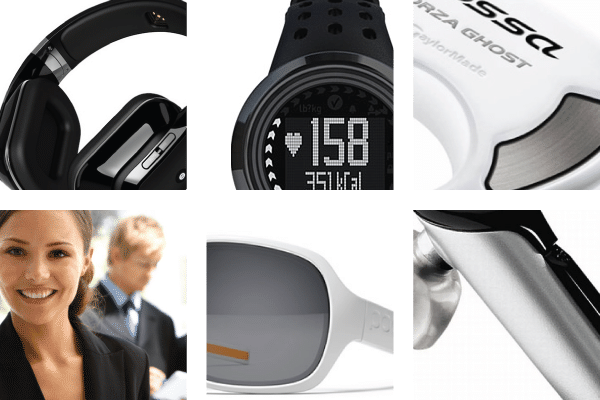
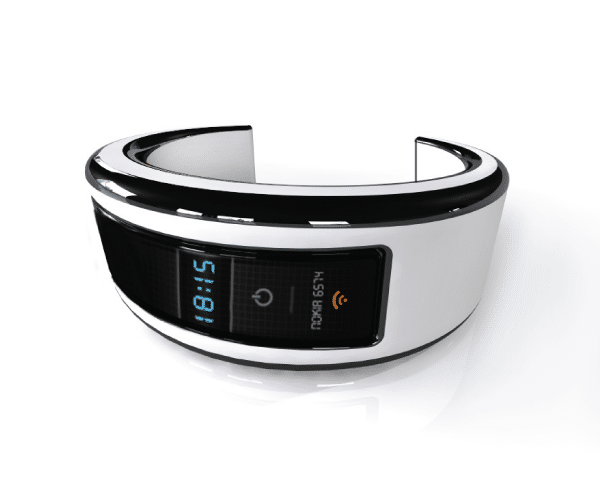
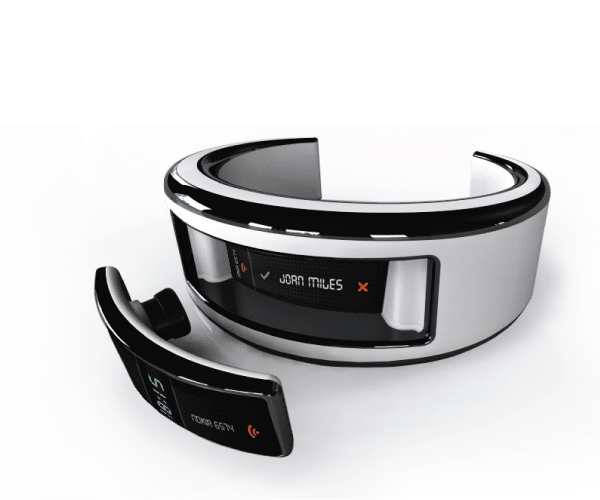
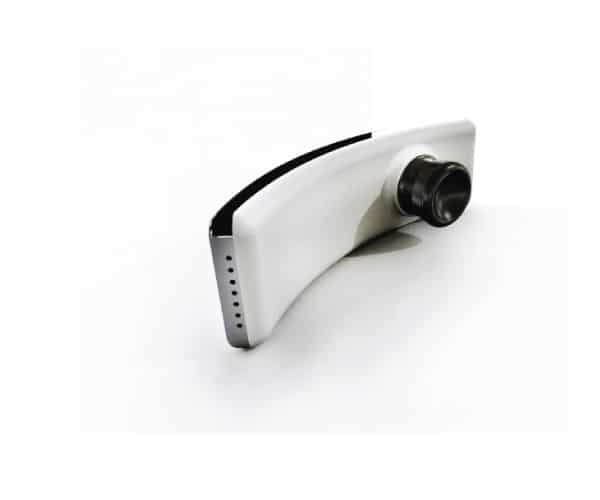
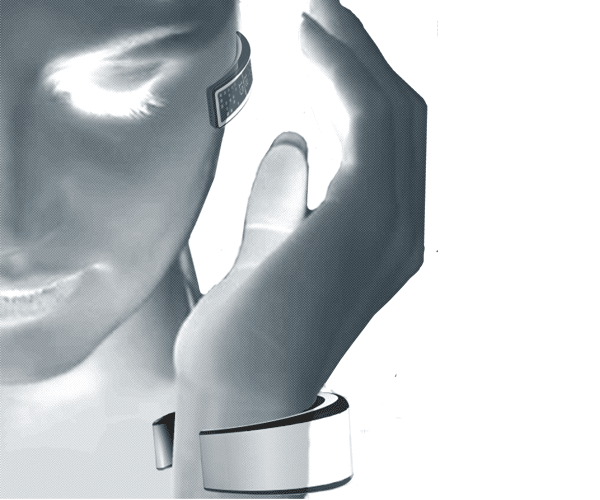
It’s a concept project that is looking into the possibilities of creating a gadget that will alert you to the subjects and trends you are interested in. This project, designed by Pedro Gomes, is a truly brilliant solution to a big problem. Not only will it be the mega delivery of online information, but it will also track heart rate, calorie intake, who’s calling you and a lot more.


It will be somewhat like an information funnel in which you decide what’s coming through. It will come in the form of a headset or a bracelet, and it will utilize the bluetooth technology to make it seamless and easy to use and carry around. Also, when inactive, it will work as a storage device which securely keeps your data close at hand. It’s one of the coolest gadgets this week for sure. When will it be available? Well, at this point, it’s only a concept design, but I will follow this development closely and will deliver any new information I might gather.


"

Stylish Dual Music Player: MP3 And CD Player In One!

Stylish Dual Music Player: MP3 And CD Player In One!: "

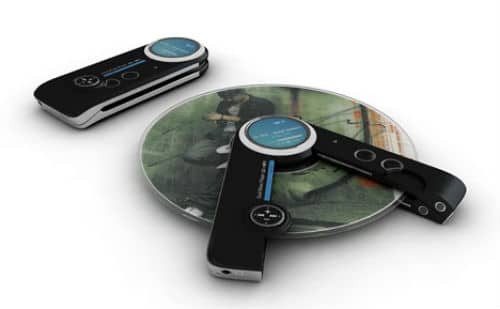
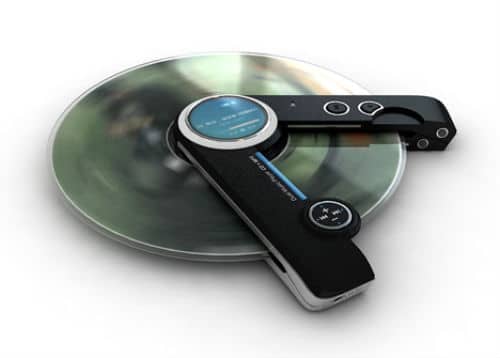
When I travel, I make sure that I have my iPod with me, especially during long flights. I know a lot of you guys do that as well. It always helps, especially when the flights are delayed. I tend to lean towards music as a source of entertainment rather than movies when traveling. Most of us have a collection of music stashed in our computers and MP3 players, and of course, there are still some of us who have CDs.


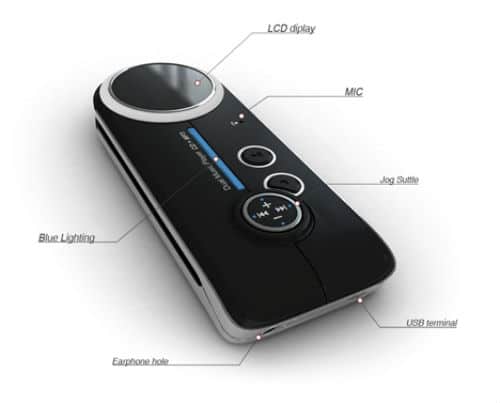
Often times, what we do is convert the audio files from our CDs so that we can store the music on our iPods. However, often times due to our busy schedules, we are not able to do this and the CDs are left unplayed. I found a very cool dual music player over at Yanko Design. It is an MP3 and CD player in one, designed by Yong-Seong Kim. Now you don’t have to worry about finding time to transfer or convert your CD music collection. Play your music any way you like it!


Image Credit: [Sergej Khakimullin / ShutterStock]


"

Seagate releases 1.5TB FreeAgent GoFlex portable HDD

Seagate releases 1.5TB FreeAgent GoFlex portable HDD: "


Seagate is introducing the FreeAgent GoFlex USB 3.0 1.5-terabyte edition, which the company claims is the world’s first to offer a 2.5-inch hard drive with a 1.5 TB capacity. And for fast access to the mountains of data and content that can represent, Seagate has packed a USB 3.0 interface onto the drive—and the unit will still work with USB 2.0 devices."

Sony Eclipse: The Music Gadget That Sticks!

Sony Eclipse: The Music Gadget That Sticks!: "

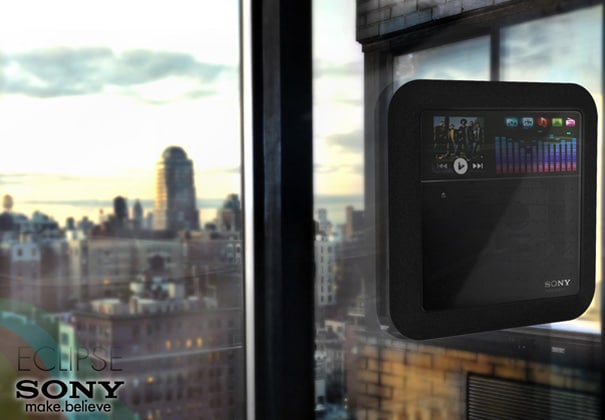
There are so many different gadgets out there now that enable you to play music. It’s a whole overgrown jungle to navigate through in order to find something that will suit you. However, I am not saying it is all junk that can be thrown to the ditches of the wastelands. Sure, some of it is junk, but there’s a new concept of media players that I am sure will get a lot of attention if it’s ever finalized and retailed.


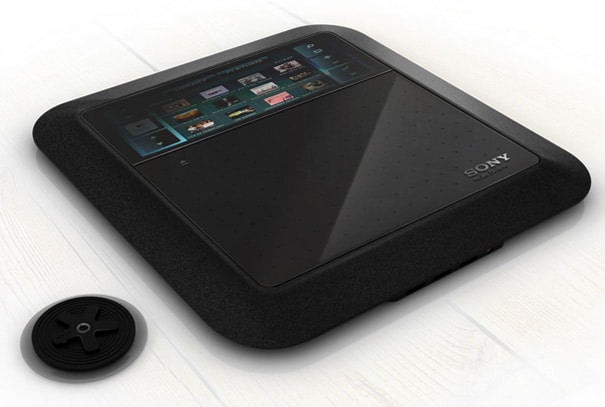
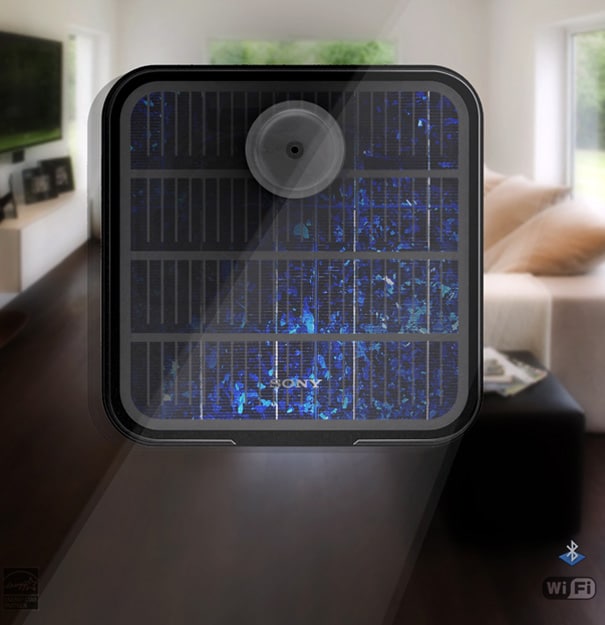
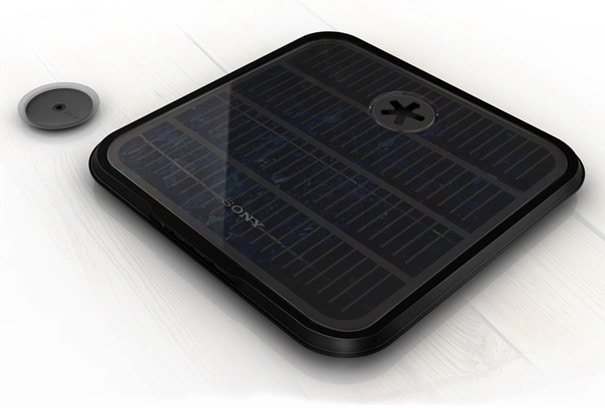
It’s a concept design called Sony Eclipse, and it is the brain child of designers Hoang M Nguyen & Anh Nguyen. It’s a media player that you stick on your window. Why? Well, it’s rather simple really. It draws its power from the sun and stores it for evening pleasures. It makes it the most environmentally friendly media player to date really.


It’s not always easy to explain the nature of an idea, but this one is one of the few that truly has a clear message. Stick it on your window, let it draw the free energy and start enjoying the movies and music before you go to sleep. Make it your evening entertainment system, and you’ll save a ton of money on the electrical bill. Sounds like a good idea to me. If only these concepts would become reality, I am sure we would speed up the restoration process of our little plush planet.


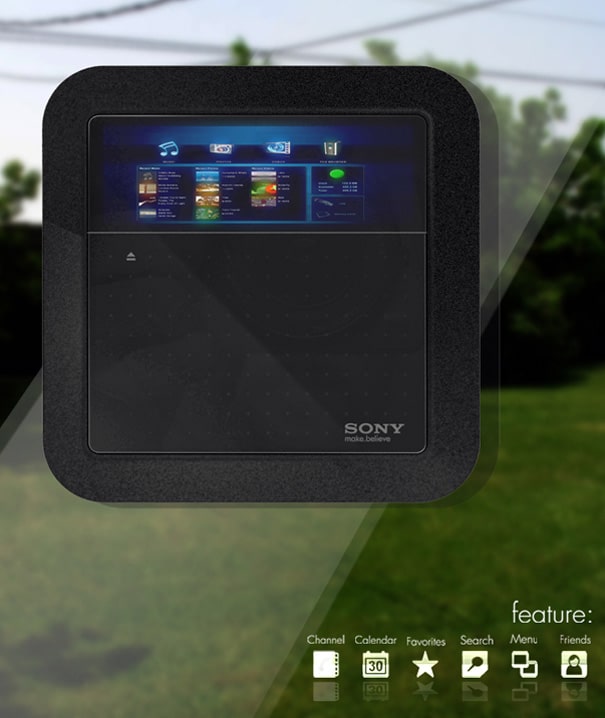
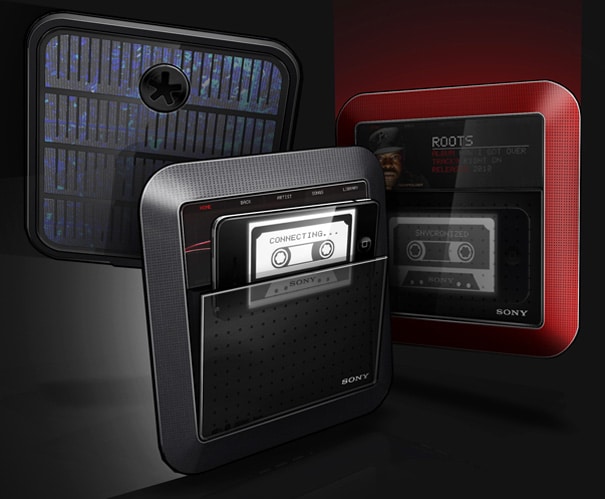
There is also an iPhone dock possibility to it, not to mention the screen saver store where you can download a bunch of great artwork and whatnot… there seems to be a lot of thought behind it. Props!


"

Saturday, October 9, 2010

Sony Eclipse: The Music Gadget That Sticks!

Sony Eclipse: The Music Gadget That Sticks!: "

There are so many different gadgets out there now that enable you to play music. It’s a whole overgrown jungle to navigate through in order to find something that will suit you. However, I am not saying it is all junk that can be thrown to the ditches of the wastelands. Sure, some of it is junk, but there’s a new concept of media players that I am sure will get a lot of attention if it’s ever finalized and retailed.


It’s a concept design called Sony Eclipse, and it is the brain child of designers Hoang M Nguyen & Anh Nguyen. It’s a media player that you stick on your window. Why? Well, it’s rather simple really. It draws its power from the sun and stores it for evening pleasures. It makes it the most environmentally friendly media player to date really.


It’s not always easy to explain the nature of an idea, but this one is one of the few that truly has a clear message. Stick it on your window, let it draw the free energy and start enjoying the movies and music before you go to sleep. Make it your evening entertainment system, and you’ll save a ton of money on the electrical bill. Sounds like a good idea to me. If only these concepts would become reality, I am sure we would speed up the restoration process of our little plush planet.


There is also an iPhone dock possibility to it, not to mention the screen saver store where you can download a bunch of great artwork and whatnot… there seems to be a lot of thought behind it. Props!


"