Showing posts with label Tech. Show all posts

Friday, April 1, 2011

Nokia will be able to customize 'everything' in Windows Phone 7, but likely won't

Nokia will be able to customize 'everything' in Windows Phone 7, but likely won't: "

Stephen Elop, in his financial and strategy briefing continuing Nokia's marathon Capital Markets Day, just posed an interesting rhetorical question: will Nokia be able to 'customize everything' on Windows Phone 7 in order to differentiate itself? 'Yes!' was Elop's ebullient proclamation, though he quickly pulled it back to say that Nokia likely won't make extensive use of this freedom to tailor Microsoft's OS. Instead, the company will be cautious and seek to maintain compatibility rather than pushing the boat out too far in tweaking the underlying software. That's a major shift for Microsoft, who forbade HTC from skinning Windows Phone 7 with Sense, something the Taiwanese company would surely have loved to do, and limited it to the introduction of a self-contained Hub. Now Nokia's saying it -- perhaps exclusively -- has been given the liberty to play around inside WP7 to its heart's content. We'll see how important that turns out to be whenever Nokia delivers its first device bearing its new smartphone OS. An insider tip tells us the current plan is to introduce such a handset by the end of 2011, potentially based on current hardware. Who's ready for Xbox Live on a future version of the N8?

Sunday, January 16, 2011

Enjoy Bluray movies via usb on Samsung TVs - Tips & Tricks


One of the best features of Samsung's Plasma TVs is the ability to play video files directly from a USB memory stick or hard drive. This feature is alternately referred to as USB Movie 2.0 or Wiselink. Sure, you could buy a TV without this and then add on something like WDTV or Roku but that's an added expense and one more remote to clutter things up. Samsung has done a great job of integrating the media player into the TV. However, the manual doesn't explain everything as clearly as it could, so I've written down some of the problems and solutions I've encountered.

The TV supports a variety of video file formats, such as AVI, MP4, MKV, and VOB. These are really just "containers" for audio and video information, so just because you have one of these files there's no guarantee that the TV will play it. Within the container, the audio and video is stored using a codec. Common video codecs are Divx, Xvid, and MPEG4. Common audio codecs are AC3, MP3, and DTS. You can use software like VLC to tell what codecs were used to create a particular file.

Not supported audio codec

MKV has become popular with high definition material (720p, 1080p). However, the most common problem when you try to play an MKV file is that the video works but the error message comes up: "Not supported audio codec" and there is no sound. Most of the time, this is because the audio was encoded with Digital Theater System (DTS) which the TV doesn't support (Samsung didn't want to pay the license fee). You can easily fix this by reencoding the file to Dolby Digital (AC3) using PopCorn Audio Converter.

Dialog is not in English

MKV files often contain more than one audio track. However, the TV has no way to select between the tracks, so if the default audio track is not the one you want, you can't change it while you're watching. First, open the file with VLC to make sure there is an English language track in the file. Then, open the file in MKVmergeGUI (part of MKVtoolnix) which will allow you to select exactly which audio track you want, and create (aka "remux") a new file that has only that audio track.

It is possible that a file could have both problems - DTS audio and a primary non-English track. In that case, first remux a new MKV using mkvmerge with only the audio track you want. Then, run it through the DTS to AC3 conversion.

The TV won't display subtitles

Just as an MKV file can contain more than one audio stream, it may also contain subtitles, however the TV doesn't support this subtitle format. First, extract the subtitles from the file using MKVExtractGUI. Then, run the output through Subtitle Workshop to convert to SRT format which the TV supports. Make sure you name your new SRT file exactly the same as your MKV file (except for the file name extension, which will obviously be different: .SRT versus .MKV) and put it in the same directory as the video file. Then, you can activate the captions using the CC button on the TV's remote control.

Archiving your DVDs to a hard drive

With 1TB hard drives available for under $100 now, you might want to backup your DVD collection. This would allow you to play any of your movies off the hard drive without having to search for the discs. However, if you try to just copy the files off your DVD and play them on the TV, you probably won't get what you're expecting, even though the TV supports VOB files. The file may not play at all, or the video will start and end in weird places. This is because the DVD menu also contains instructions on where the video should start and stop, but the TV doesn't know how to read that data. The solution is to use DVDShrink to remaster the DVD and extract just the video you want. This will work for both a movie that is one big file as well as a DVD with TV shows on it, where you want a separate output file for each episode. Put the DVD in the computer and start DVDShrink. Select the Re-Author function and then select the various video tracks that you want to extract. Select Backup to copy those files to your hard drive. Now you can open each of those VOBs will be a self-contained video file that the TV can recognize.

Tuesday, December 28, 2010

Technology: Use Your 3D Printer To Print Edible Food!

Technology: Use Your 3D Printer To Print Edible Food!: "

I know what you are thinking, and yes, this is nuts. However, it’s nuts and it’s true, so if you are into new technologies, you will love this! We often talk about how technology is moving at the speed of light, and this is a perfect example of that. This is something that wouldn’t have even been conceivable a few years ago, but a team in the Cornell University’s Computational Synthesis Lab (CCSL) is very close to having it all figured out. The technology is definitely available now to make this possible.


Using a 3D food printer, you will soon be able to print hot steaming food right at your dinner table. Instead of using regular ink cartridges, you will use food ink cartridges. For example, there would be a chocolate cartridge, a flour cartridge, and even a raw foods cartridge if you wanted to print some really healthy food one evening. You would even be able to customize your food’s taste and texture depending on what you prefer. If you like your steak cooked medium-rare, you will be able to adjust the setting to make it perfect. Whether you like your green beans crunchy or soft, or your eggs runny or scrambled, you will be able to simply adjust a setting before cooking… err… printing. You will even be able to print the perfect piece of sushi.


As crazy as this may sound, imagine for a moment the positive impact it would have on our environment. According to BBC, “You can imagine a 3D printer making homemade apple pie without the need for farming the apples, fertilizing, transporting, refrigerating, packaging, fabricating, cooking, serving and the need for all of the materials in these processes like cars, trucks, pans, coolers, etc…” Imagine being able to email that recipe right to someone’s printer for them to hit print and eat for dinner. The idea of “treating someone to dinner” just got a whole lot different. This is not just a design concept conceived by a creative designer, no, this is here, and it’s developing as we speak. You can read all the technology details here.


[via BBC]

"

Sunday, October 10, 2010

Nokia Plug and Touch turns any display into a touchscreen [Video]

Nokia Plug and Touch turns any display into a touchscreen [Video]:

Amazing app from Nokia. The Nokia Blog spotted “Plug and Touch” running on the Nokia N8, an app which basically turns any HDMI-connected display (whether HDTV, projector or something else) into a huge touchscreen.


nokia plug and touch research 540x303


The app takes advantage of the N8′s HDMI port, putting the Symbian^3 smartphone’s display up on your big-screen TV.  Then the handset’s 12-megapixel camera is used to keep track of where your finger is, basically working as an impromptu optical touchscreen.


Right now, it’s apparently not entirely accurate or polished, and Nokia’s people are working on the speed of responsiveness.  At some point they’re hoping that the phone itself won’t need to be clamped into place and the physical connection cut, perhaps using WiFi streaming with DLNA instead.  With more of Nokia’s high-end handsets packing HDMI connections, we’re hoping this is something that graduates from the labs and appears on shipping devices – it’s just the sort of thing Symbian needs to show people it’s still a relevant OS.

Looxcie wearable camcorder will take your lifecasting to the next, boring level

Looxcie wearable camcorder will take your lifecasting to the next, boring level: "

The Looxcie wearable is an awesome creation. It's an always on camera that stores up to five hours of video, and is capable of quickly emailing short clips to your various social networks . Once your cam reaches its max storage capacity, it begins purging the oldest video and continues to record. Using Looxcie's app enables you to quickly share your videos with the world. The Looxcie wearable video camera is available now for $199 -- but please keep in mind: watching you watch.


ON TIME Headset: New Technology To Keep You Informed

ON TIME Headset: New Technology To Keep You Informed: "

It’s not an understatement to say the once this whole social networking business got booming, every company, big or small, has gotten a much busier schedule to maintain. Keeping up with what goes on has almost become a full time job, and finding the right tools to keep track of the fast changing trends can sometimes be hard, if not impossible. There are; however, a few tools in development to keep us more at ease and more structured.


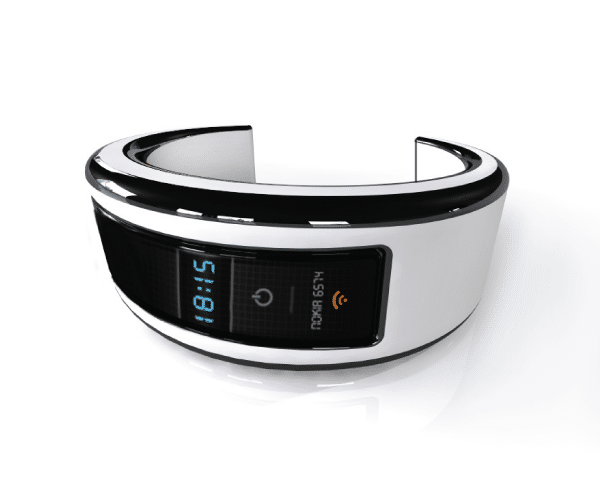
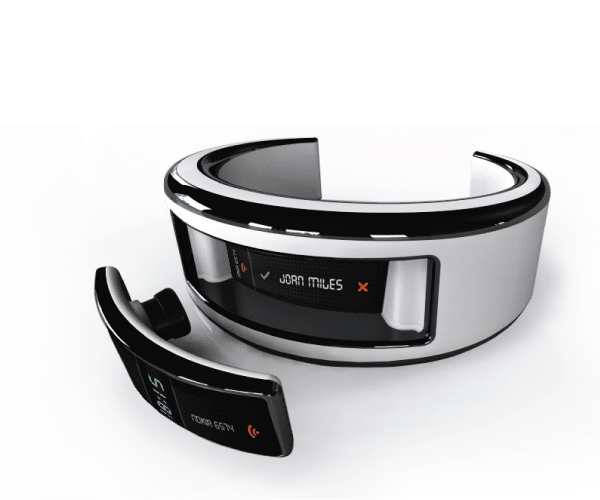
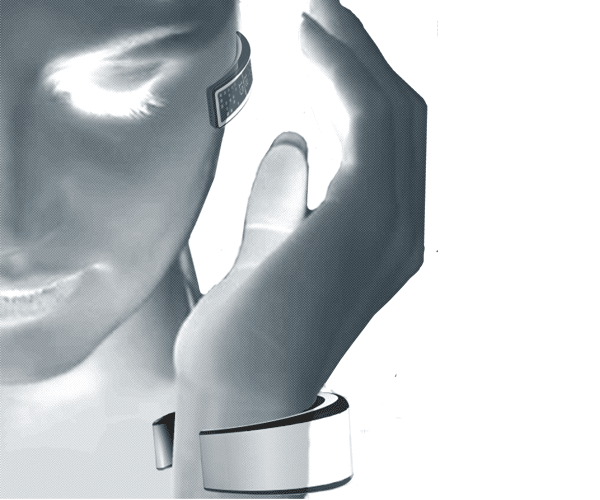
It’s a concept project that is looking into the possibilities of creating a gadget that will alert you to the subjects and trends you are interested in. This project, designed by Pedro Gomes, is a truly brilliant solution to a big problem. Not only will it be the mega delivery of online information, but it will also track heart rate, calorie intake, who’s calling you and a lot more.


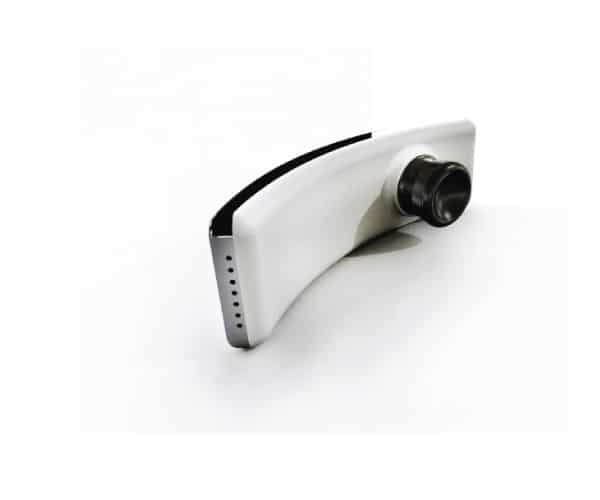
It will be somewhat like an information funnel in which you decide what’s coming through. It will come in the form of a headset or a bracelet, and it will utilize the bluetooth technology to make it seamless and easy to use and carry around. Also, when inactive, it will work as a storage device which securely keeps your data close at hand. It’s one of the coolest gadgets this week for sure. When will it be available? Well, at this point, it’s only a concept design, but I will follow this development closely and will deliver any new information I might gather.


"

Saturday, September 11, 2010

The Future Of Touchscreen Technology Is More Than Awesome!

The Future Of Touchscreen Technology Is More Than Awesome!: "

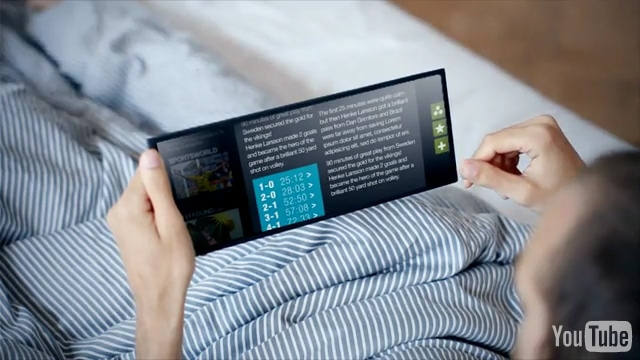
Sometimes living in Sweden can be quite an inspiration if I may be so bold and patriotic to say that. I bet there are a lot of people out there that keep wondering what might come after this huge boom of touchscreens that we see on pretty much every device released on the market these days. Well, if you have a bit of imagination and dare to dream a little, you might come up with something like this.


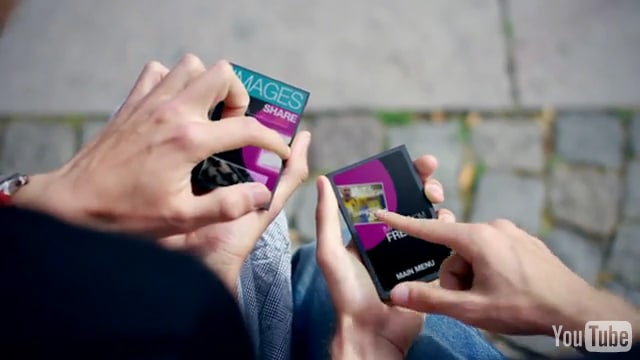
From the interface brain champions over at the Swedish geek headquarters of The Astonishing Tribe comes a stunning and truly inspiring new technology that I am sure plenty of people will find really appealing. It’s an entirely new way of using your devices with plenty of new features.


Using the legendary nano-technology, we will soon be able to create devices that are way more advanced than our brains can comprehend. The hand gestures are exchanged for some rather awesome pulling and pushing maneuvers. You will literally be able to increase the screen size of your device by dragging the gadget just like modeling clay. At least if we are heading for something in the vicinity of what these badboys have managed to brainstorm. It’s simply amazing! Not to mention state of the art beautiful!


"

Symbian^3 is OPEN !!!

When the Nokia N8 arrives, it will be Nokia’s first device to run Symbian^3, the Symbian Foundation’s newest mobile platform, and their first entirely open source release.

If you’ve used a Nokia smartphone in the past 10 years you’ve used Symbian, the platform that powers Nokia’s smartphones, as well as those of several other device manufacturers. With more than two-fifths of the worldwide smartphone market share, Symbian is by far the world’s most used smartphone platform. To understand just how dominant Symbian is, that means that out of all the smartphones in the world, a little less than half run Symbian, and the other half run a mobile OS from one of about four major competitors. During Q1 of 2010, roughly 260,000 Symbian devices were shipped globally every day: an average of just over 3 phones a second. Symbian^3 is the next evolution of the Symbian platform, introducing improvements and features such as HDMI support, touch gestures, and multiple, 3D-accelerated home screens (a more comprehensive feature list can be found here).

The Benefits of Being Open

Right now, you must be thinking, “Great, but how is any of this of benefit to me?” Essentially, by becoming open source, the Symbian platform will be able to evolve and improve more quickly than has been possible in the past, as anyone in the world will be able to suggest and contribute modifications or improvements to the platform. Symbian already multiple programming languages and application environments, including Qt – now it will be easier than ever to write programs for Symbian, as programmers have access to the system’s complete source code. For one, this will allow them to integrate their programs into the platform in ways not possible in a closed system. Also, by reading the source code, programmers will be able to create more cohesive and elegant code.

An open-source approach allows users to be more pro-active with their devices as well. For example, as Ovi Suite is currently Windows only, many users find it difficult to sync data between a Nokia phone and a Mac/Linux machine. Now that the codebase is open source, someone will be able to come along, look at the operating system’s sync mechanisms, and write their own solution to interface Symbian and the personal information manager of their choice.

When the Symbian Foundation released its entire codebase as open source (tens of millions of lines of code) a full four months ahead of schedule, it was an amazing feat. Here at Nokia, we’re excited about the experience that the new open source Symbian^3 platform promises to deliver on our new Nokia N8 device.

Reasons you will love Symbian^3

We’re often told not to believe everything we read in the newspapers. When it comes to smartphones, you can see why. Certain devices, it seems, are always in the news. But is the huge amount of media coverage a reflection of their sales? The simple answer is no. In the 2nd quarter of 2010, Symbian smartphones had a whopping 47.2% of the market. More Symbian devices are being shipped than ever. According to the research company Gartner, over 80 million Symbian devices were sold worldwide in 2009. Whatever way you look at it, Symbian is the world’s most popular mobile operating system.

A labour of love

Symbian^3, the latest version, was officially completed on June 17th. In the months since, Nokia’s brainboxes have been busy testing and refining to ensure it works brilliantly in the soon to be released Nokia N8 and the devices to follow. According to the Symbian Foundation there are more than 250 new features in this latest release, all of which are documented at the Forum Nokia Library. There are hundreds of pages to get through, but rather than have you trawl through them, we’ve found three developments that we think will make you fall in love with Symbian^3.

Graphics you’ll adore

Everyone loves fantastic graphics, and the Symbian^3 delivers with new graphics architecture that combines hardware acceleration and speedier software. That means an even more responsive interface, with cool added features like kinetic scrolling that’s sure to dazzle your buddies when you show off your phone. Add to that the fact the interface is programmable and you can expect developers to go crazy creating fantastic themes and apps to make your phone unique.

Multimedia you’ll lust after

Now more than ever before, our devices are multimedia centres. Symbian^3 takes this to a whole new level by supporting output to HDMI (High-Definition Multimedia Interface). Imagine, you’ll be able show your pics or videos on television and hear sound on Dolby Digital Audio. Steven Spielberg eat your heart out! And that’s not all: the music player includes a home page widget for faster control of your song list and there’s a new Fusion Player for stored and streaming video.

Multitasking you’ll cherish

If, like us, you never seem to have enough hours in the day, you’ll know how important Symbian’s multitasking is. Well, with Symbian^3 your life is set to get even more efficient. Thanks to improved memory, you can run even more apps at the same time without running out of space. Plus, you’ll be able to use an ‘Alt-Tab’ style task switcher to move between the applications you’ve got open.

Lets see what's coming .

Phone charged by Hamster

Nokia N8's Amazing capacity - WAT LL U DO WIT IT

Friday, July 23, 2010

DIY fart detecting remote control

DIY fart detecting remote control: "

This DIY hack is gross and funny all at the same time. A guy on Instructables going by Schmidt has posted up a how to on building a remote control that will change the channel on the TV to a random channel each time it detects a fart.


fartoperatedremote sg


The builder came up with the idea after seeing a hack using Arduino to turn a TV on and off using a brainwave headset and an office chair that twittered each time the user farted. Using ingenuity and a love for flatulence the guy cobbled the two together.


Now each time the builder’s dad busts a groupie, the TV turns to a random channel. That is a great gag for sure. The parts list includes a methane sensor, Arduino, and a few more items. This would be funny, but my kids would fart on it on purpose.


Relevant Entries on SlashGear


"

Saturday, June 19, 2010

HTC EVO 4G ..... BIG SCREEN...4.3inches....WT

HTC EVO 4G fully rooted, freedom loving people everywhere rejoice: "

You've undoubtedly been following the story -- hell, maybe you've even partaking in some serious WiFi tethering. Well, the Android Police (not an actual police force) are reporting that the EVO 4G has finally been rooted, fully and completely. What's this mean? Well, for starters, enterprising individuals will soon be writing to /system from within the OS, removing Sprint's apps and flashing from custom ROMs. Pretty sweet, right? Hit up the source link to get started! But please, don't brick your phone. For real.

HTC EVO 4G fully rooted, freedom loving people everywhere rejoice originally appeared on Engadget on Mon, 14 Jun 2010 19:46:00 EDT. Please see our terms for use of feeds.

Permalink   |  sourceAndroid Police  | Email this | Comments"

ForceTek XIO: the gaming controller that hurts you, not the TV (video)

ForceTek XIO: the gaming controller that hurts you, not the TV (video): "

Forget the Wiimote, PlayStation Move and Kinect; here's a controller that actually makes you feel the games. At E3 earlier this week, startup firm ForceTek was seen demoing its XIO Virtual Gaming System -- a rather fancy name for a force-feedback arm exoskeleton that 'provides a controlled resistance' to your arm and wrist movement. The rig sure looks like a great addition for action games -- imagine feeling a virtual basketball bouncing, or your virtual machine gun recoiling, or even the reaction force from a virtual punch. Want it now? Try next year, when the XIO will apparently ship at a 'competitive' price comparable to that of a guitar for Guitar Hero. See the controller in action after the break, and try not to wince.

Continue reading ForceTek XIO: the gaming controller that hurts you, not the TV (video)

ForceTek XIO: the gaming controller that hurts you, not the TV (video) originally appeared on Engadget on Fri, 18 Jun 2010 21:03:00 EDT. Please see our terms for use of feeds.

Permalink DVICE  |  sourceSeriouslyE3 (YouTube), Awesome Game Blog  | Email this | Comments"

Saturday, December 26, 2009

nOkiA n97 mInI


5mp Camera
8gb Internal memory
Fm & Music player
13 x 52.5 x 14.2 mm Dimensions
138g Weight
Pocket friendly ..not bulky as the N97
3g and wifi and GPRS
RAM 128mb
CPU - ARM 11 434 MHz processor
GPS free

BATTERY
Stand-by Up to 320 h (2G) / 310 h (3G)
Talk time Up to 7 h 10 min (2G) / Up to 6 h (3G)
Music play Up to 32 h

Loads of fun apps n games ....java supportive... flash lite player,video n photo editor,voice command....
One of the best phones from NOkiA...Could have been better without the slide out keyboard (for casual users)